
Can you turn on a Redstone Lamp in Minecraft? Absolutely! Turning on a Redstone Lamp in Minecraft is a fundamental skill for any builder looking to add functional lighting and complex contraptions to their world. This guide will break down everything you need to know about powering these versatile blocks.
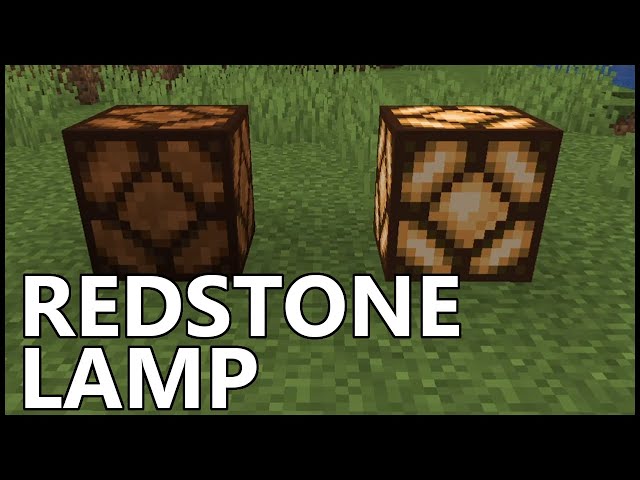
Image Source: i.ytimg.com
Powering Your Redstone Lamp: The Basics
A Redstone Lamp is a block that emits light when it receives a Redstone signal. It’s a simple yet powerful component in the vast world of Redstone engineering. To get it to light up, you need a power source that sends a Redstone signal to it. Think of it like a light switch for your virtual home.
What is a Redstone Signal?
A Redstone signal is essentially an invisible flow of power in Minecraft. It’s carried by Redstone dust and can be transmitted through various components. The strength of this signal matters; it can range from 0 to 15. For a Redstone Lamp, any signal strength of 1 or higher will turn it on.
Methods to Activate a Redstone Lamp
There are many ways to provide a Redstone signal to your lamp. We’ll explore the most common and effective methods, from simple switches to more automated systems.
Using a Lever
A lever is a basic and reliable way to manually control your Redstone Lamp.
How to Place and Use a Lever
- Crafting a Lever: You’ll need a cobblestone and a stick. Place the cobblestone in the middle slot of your crafting grid and the stick directly above it.
- Placement: Right-click on any solid block next to your Redstone Lamp.
- Activation: Right-click the lever. When the lever is in the “on” position, it will send out a Redstone signal.
Connecting Lever to Lamp
- Direct Connection: Place the lever on a block directly adjacent to the Redstone Lamp. The signal will flow directly into the lamp.
- Redstone Dust Connection: Place Redstone dust from the lever to the lamp. You can have multiple blocks between the lever and the lamp, as long as the Redstone dust connects them.
Using a Button
A button provides a temporary Redstone signal. When pressed, it sends a pulse of power, which is great for short bursts of light or timed events.
How to Place and Use a Button
- Crafting a Button: Buttons can be crafted from wood planks or cobblestone. A stone button requires one stone, while a wooden button requires one plank.
- Placement: Right-click on a block next to your lamp.
- Activation: Right-click the button. It will briefly send a Redstone signal and then return to its unpressed state. The duration of the signal depends on the type of button (wooden buttons last longer).
Connecting Button to Lamp
Similar to levers, you can connect buttons directly to the lamp or use Redstone dust to extend the circuit.
Using a Pressure Plate
A pressure plate is an excellent choice for automatic activation. When a player, mob, or dropped item stands on it, it sends out a Redstone signal.
Types of Pressure Plates and Their Signals
- Wooden Pressure Plate: Activated by players, mobs, dropped items, and even fireworks. It has a longer activation time.
- Stone Pressure Plate: Activated by players, mobs, and dropped items. It has a shorter activation time compared to wooden ones.
- Weighted Pressure Plate (Light & Heavy): These are activated by players and mobs. They send a signal strength based on the number of players or mobs on them. A heavy plate sends a stronger signal with more entities.
Connecting Pressure Plates to Lamps
Place the pressure plate on the ground. You can connect it to the lamp using Redstone dust. For example, place the pressure plate, then Redstone dust underneath it that leads to the lamp.
Using a Daylight Sensor
The daylight sensor is a fantastic way to automate your Redstone Lamps based on the time of day. It can turn lamps on at night and off during the day, or vice versa.
How to Use a Daylight Sensor
- Crafting: Crafted from Nether Quartz and Wood Slabs.
- Placement: Place it anywhere in your world.
- Signal Output: By default, it outputs a signal when it’s dark. Right-click the sensor to switch its mode to output a signal when it’s bright.
- Signal Strength: The signal strength varies depending on how dark or bright it is.
Connecting Daylight Sensors to Lamps
Place Redstone dust from the daylight sensor to your Redstone Lamp. You can use repeaters to ensure the signal reaches the lamp without fading if the distance is too great.
Using a Redstone Torch
A Redstone torch is a primary component for creating consistent Redstone signals and inverting them. It constantly emits a Redstone signal.
How to Use a Redstone Torch
- Crafting: Crafted from a stick and Redstone dust.
- Placement: Place it on the side of a block or directly on the ground.
- Signal Output: It continuously outputs a Redstone signal of strength 15.
Connecting Redstone Torches to Lamps
You can place a Redstone torch directly next to your lamp or use Redstone dust to transmit its signal.
Using a Redstone Block
A Redstone block is a solid block that constantly emits a Redstone signal of strength 15.
How to Obtain a Redstone Block
- Crafting: Combine nine Redstone dusts in a crafting table to create one Redstone block.
- Naturally Occurring: Found in Woodland Mansions and Desert Temples.
Connecting Redstone Blocks to Lamps
Place the Redstone block adjacent to your Redstone Lamp to power it. This is a simple, constant power source.
Advanced Redstone Lamp Circuits
Beyond direct connections, you can build more complex circuit designs for dynamic lighting.
Inverting Signals (NOT Gate)
Sometimes, you want a lamp to turn off when a switch is flipped. This requires an inversion.
- Method: Place a Redstone torch on the side of a block. Then, place another block on top of that block, with Redstone dust on the side of the top block. If you power the block the torch is attached to (e.g., with a lever), the torch will turn off, and the lamp connected to it will also turn off.
Here’s a common setup:
- Place a block.
- Place a Redstone torch on the side of that block.
- Place your Redstone Lamp on the opposite side of the block from the torch.
- Place a lever on the block that the torch is attached to.
- When the lever is flipped “on,” it powers the block, which turns off the Redstone torch. The lamp turns off.
- When the lever is flipped “off,” the Redstone torch turns back on, and the lamp lights up.
Timers and Repeaters
To control the duration of the light or create timed sequences, you’ll need Redstone repeaters.
- Redstone Repeaters: These components boost a fading Redstone signal and can also introduce delays. Placing repeaters in a chain, each set to a different delay, allows you to create timers.
Example Timer Circuit:
- Place a lever.
- Connect it with Redstone dust to a line of repeaters.
- Set each repeater to a different delay (right-click on them).
- Connect the end of the repeater chain to your Redstone Lamp.
- Flipping the lever will send a signal through the repeaters, activating the lamp after a set delay.
Logic Gates for Complex Control
You can combine multiple switches, sensors, and components to create logic gates that control your lamps in intricate ways.
- AND Gate: The lamp only turns on if both inputs are active.
- OR Gate: The lamp turns on if either input is active.
- XOR Gate: The lamp turns on if one input is active, but not both.
These gates are built using combinations of Redstone dust, Redstone torches, repeaters, and solid blocks.
Table of Redstone Lamp Activation Components
| Component | Activation Type | Signal Duration | How it Works |
|---|---|---|---|
| Lever | Manual | Continuous | Stays on or off until manually flipped. |
| Button | Manual | Temporary | Sends a short pulse of power. |
| Pressure Plate | Automatic | Temporary | Activates when an entity or item is on it. |
| Daylight Sensor | Automatic | Variable | Activates based on light levels. |
| Redstone Torch | Persistent | Continuous | Constantly emits a full Redstone signal. |
| Redstone Block | Persistent | Continuous | Constantly emits a full Redstone signal. |
Practical Applications of Redstone Lamps
Redstone Lamps aren’t just for show. They serve many practical purposes in Minecraft.
Home Lighting
The most straightforward use is providing light for your bases and structures. You can set up automatic lighting systems that turn on when it gets dark using daylight sensors.
Warning Indicators
Use lamps to signal danger or important events. For instance, a lamp could turn on if a door is breached or if a certain area is entered.
Navigation and Signposting
Lamps can guide players through complex builds or mark paths. You could have a path light up as you approach it using pressure plates.
Decorative Elements
Their clean, modern look makes Redstone Lamps perfect for adding atmospheric lighting to any build, from cozy cottages to futuristic cities.
Machine Status Indicators
In complex contraptions, a Redstone Lamp can indicate if a machine is running, idle, or experiencing an error.
Tips for Building with Redstone Lamps
- Signal Strength: Remember that Redstone signals weaken over distance. Use Redstone repeaters to boost signals for long circuit runs.
- Block Choice: The block you place a lever or Redstone torch on can affect how the signal transmits. Experiment to see what works best.
- Hidden Wiring: Use Redstone dust under the floor or behind walls for a cleaner look.
- Redstone Dust Placement: Redstone dust needs to be placed on blocks. It won’t transmit power across empty spaces.
Frequently Asked Questions (FAQ)
Q1: Why isn’t my Redstone Lamp turning on?
A: There are a few common reasons:
* No Power Source: Make sure there is a valid Redstone signal reaching the lamp.
* Weak Signal: The Redstone signal might be too weak. Redstone dust loses strength over distance (one block per dust). Use repeaters to boost the signal.
* Incorrect Wiring: Check your circuit to ensure all connections are correct. Redstone dust needs to be directly adjacent or connected through powered blocks.
* Inverted Signal: If you’re using a circuit that’s meant to turn the lamp off, ensure the inversion is set up correctly.
Q2: Can I turn on a Redstone Lamp with a thrown item?
A: Yes, you can if the item lands on or next to a pressure plate that is wired to the lamp. Some thrown items, like potions, will activate a wooden pressure plate, while others, like snowballs or eggs, won’t.
Q3: How far can a Redstone signal travel?
A: A Redstone signal can travel a maximum of 15 blocks through Redstone dust before it completely fades. You can extend this range by using Redstone repeaters, which refresh the signal back to strength 15.
Q4: Can a Redstone Lamp be powered through other blocks?
A: Yes, a Redstone Lamp can be powered by a signal transmitted through a block. If a block is powered (e.g., by a Redstone torch on its side, or a Redstone block directly behind it), any component directly adjacent to that powered block, including a Redstone Lamp, will be activated.
Q5: What is the best power source for automatic lighting?
A: For automatic lighting, a daylight sensor is often the best choice as it reacts to the natural cycle of day and night. If you want lighting triggered by player presence, pressure plates are excellent.
By mastering these methods, you can illuminate your Minecraft creations with functional and aesthetically pleasing Redstone Lamps, transforming your builds from simple structures into dynamic environments. Experiment with different components and circuit designs to discover the full potential of this illuminating block!